How to Access the Full Version Number Screen in Your Mazda for a Successful Firmware Update
- Start the ignition or turn on ACC with the push-button start (ensure the radio is ON).
- Press and hold the volume mute button. Simultaneously, press the Music and Favorite buttons for 3-5 seconds until the “Diagnostic Test” SCREEN appears.
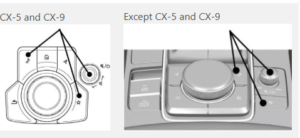
- Scroll through the list on the screen by turning your Commander Knob up or down (observe each item highlighted in orange).Press Down on your Commander Knob ONCE to select orange “Service Information” on the screen.
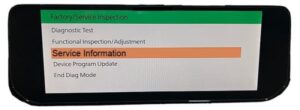
- Choose orange “Connected Device Information” on the screen.
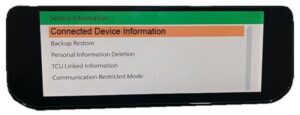
- Select orange CMU (Connectivity Master Unit).
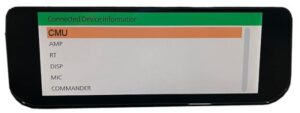
- Examine the “Device Version Information CMU” screen.
- Find the ECU Software Number, for example, ‘7000C0A-NA05_11022. Note all the Numbers + Letters from 70xxCxx-xxxx_xxxxx.
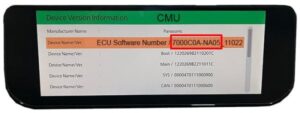
- Record your numbers, then hit the RETURN Arrow to exit the test.
ENCRYPTING FIRMWARE VERSION
Refer to the screen image above for your CMU device version information. The code, such as 7000C0A-NA01_10048 and lets try to figure what this means:
- CMU = Unit
- 7000C0A-NA01 = Model ID
- 10048 = Software Version
EU** is for Europe, UK, Australia, New Zealand.
NA** is for North America, USA, Canada, Mexico.
4A** is for GENERAL R.H.D – L.H.D, Except Hong Kong and Macau.
HK** is for Hong Kong and Macau.
RU** is for Russia.
CMU_7000C0A-NA01_12006.kwi * Mazda3 + CX-30.
CMU_7000C0A-NA02_11046.kwi * MX-30.
CMU_7000C0A-NA03_11048.kwi * CX-5 + CX-9 2021~
CMU_7230C1A- NA03_10016.kwi * Mazda3 2024 MY.
CMU_7000C0A-NA04_12006.kwi * Mazda3 + CX-30 TURBO
CMU_7000C0A-NA05_11022.kwi * CX-50 (VA).
CMU_7000C0A-NA06_12018.kwi * Mazda3 + CX-30 July 21
CMU_7000C0A-NA10_10004.kwi * MX-30 23MY~ ONLY.
CMU_7000C0A-NA11_10010.kwi * CX-90 (KK).
CMU_7000C0A-NA12_10002.kwi * CX-5 (K*) 24 MY ONLY.
EU** is for Europe, UK, Australia, New Zealand.
CMU_7000C0A-EU01_11001.kwi * Mazda3 and CX-30.
CMU_7000C0A-EU02_11030.kwi * MX-30.
CMU_7000C0A-EU03_10030.kwi * CX-5 + CX-9.
CMU_7230C1A- EU03_10016.kwi * Mazda3 2024MY.
CMU_7000C0A-EU06_12006.kwi * Mazda3 + CX-30.
CMU_7000C0A-EU07_14018.kwi * CX-60 (KH).
CMU_7000C0A-EU08_10016.kwi * CX-5 + CX-8 + CX-9.
CMU_7000C0A-EU10_11008.kwi * MX-30
CMU_7000C0A-EU00_00000.kwi * CX-80 (K-)
*the version numbers are not updated to the latest and are shown just for example.
One cannot install any Gen 7 firmware in a car intended for a different country. For example, attempting to install a 4A01 firmware into a NA01 or an EU01 is not possible. Mazda Connect systems strictly prohibit any change of country or region unless explicitly permitted by the system. In some countries, like Australia and New Zealand, you may be able to install certain Gen 7 EU0* firmware instead of 4A0* firmware, as newly manufactured cars in AU and NZ are now EU compliant but not NA0* compliant. This varies depending on the model year.