
Product Overview
This is the most recent and final firmware update for the Mazda Connect 1st Generation system (Version 74.00.324A). This genuine firmware from Mazda Japan (latest as of November 30, 2025) is a Single File (.up) installation for your region.
Special Feature: This firmware can also be used with Mazda vehicles originally from North America or Japan to access all ADR 4A languages and features.
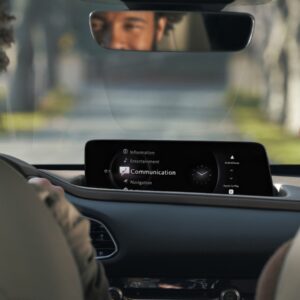
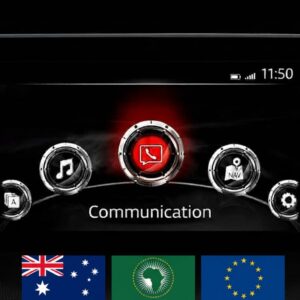
Important: This firmware is only for cars with the main menu layout shown in the photo (7-inch display with icons in a semi-circle).
🌍 Regional Compatibility
Region Code: 4A N (ADR) Supported regions and countries include: Australia, Christmas Island, Fiji, Indonesia, Kangaroo Island, Malaysia, Middle East (including Qatar, Saudi Arabia), New Zealand, Oceania, Papua New Guinea, Philippines, Singapore, South Africa/Africa, South America (Most countries), Asia (excluding Japan/China), Tasmania, Thailand.
🚗 Applicable Models
-
Mazda 2: 2014–2022*
-
Mazda 3: 2014–2018*
-
Mazda 6: 2015–2022
-
Mazda MX-5 Miata: 2014–2024*
-
Mazda CX-3: 2014–2022
-
Mazda CX-5: 2015–2022*
-
Mazda CX-8: 2019–2022*
-
Mazda CX-9: 2015–2022*
Note: Not compatible with Mazda Connect System 2 (10.25″ / 26cm displays). Only for 1st Gen systems.
✅ Upgrade Path & Compatibility
Direct Update (Single File): If your current version is 56.00.100 or newer (e.g., 56.00.200, 56.00.650, 58.00.240, 59.00.xxx, 70.00.021, or earlier 74.00.xxx), you can update directly to v74.00.324A.
Two-Step Update Required: If your current version is on or below 56.00.000 (e.g., 31.00.100, 41.00.000, 56.00.000A), you MUST update to version 70.00.100A first.
-
Note: This requires a two-file installation (Failsafe then Reinstall) available separately on this site.
🛠️ Bug Fixes & Improvements
Version 74.00.324A addresses the following issues:
-
System Stability: Fixes frequent temperature warnings and black screen issues (specifically Mazda 6).
-
Connectivity: Improves Apple CarPlay™ sound (driver-side speaker) and updates brand icons. Fixes Bluetooth call echo (MX-5 RF).
-
Navigation & GPS: Corrects inaccurate speed limits (TSR), loading screen hangs, and GPS location errors in southern latitudes/western longitudes.
-
UI & Visuals: Improved fonts and layout for i-stop, i-ELOOP, and fuel consumption menus. Fixes status bar white spots.
-
Media: Faster USB playback start times and corrected character symbols for certain languages.
-
Gracenote: Latest music metadata update package is included.
📥 Installation Requirements
-
USB Drive: 4GB to 16GB (Strictly FAT32 formatted). Do not use drives larger than 16GB.
-
Time: Approx. 15–30 minutes.
-
Power: Healthy vehicle battery or engine running during the entire process.
🛠️ Installation Instructions
Step 1: Preparation
-
Format your USB stick to FAT32.
-
Copy the .up file to the root directory (do not use folders).
-
Crucial: Disconnect all devices from USB ports and remove the Navigation SD card before starting. Re-insert it only after the update is finished.
Step 2: Enter Diagnostic Mode
-
Turn vehicle to ACC or ON mode.
-
Press and hold: Music Note + Favorites + Mute (Volume) for about 5 seconds.
-
Navigate to: System Update > Search for Update.
Step 3: Update Process
-
The system will detect the file. Confirm to start the update.
-
Warning: Do not power off the vehicle or remove the USB until the “Update Successful” message appears. The system will reboot automatically.
-
Verify the new version in the Diagnostic Menu.
📦 What’s Included
-
Firmware File:
v74.00.324A 4A N(.up format). -
Comprehensive PDF Guide: A step-by-step installation manual included for download.
Disclaimer: This update covers original Mazda systems only. We are not liable for malfunctions in aftermarket accessories or non-genuine components.
Liam O’Connor –
Solid service. The file structure was correct and the installation took about 15 minutes in total. I had to format my USB drive twice to get it recognized, but that’s a Windows issue, not the file itself.
Callum Smith –
Verified working on my 2019 CX-5 in New Zealand. I was worried about getting the wrong regional file, but the ADR version provided here is spot on. CarPlay connects much faster now. Cheers for the quick download!
Oliver Wright –
Gave my Mazda 3 a much-needed update. I’m located in Brisbane and was having issues with the infotainment screen freezing occasionally. This ADR firmware installed without a hitch and the system feels snappier now. Excellent and clear instructions.