
Mazda Connect 1 Firmware Update v70.00.367A NA (USA, Canada, Mexico, Puerto Rico, 2014-2024)
Product Overview
This is a robust firmware update (Version 70.00.367A) for the Mazda Connect 1st Generation system. In this version, Mazda transitioned to a Single File (.up) installation, simplifying the update process significantly for the North American market.
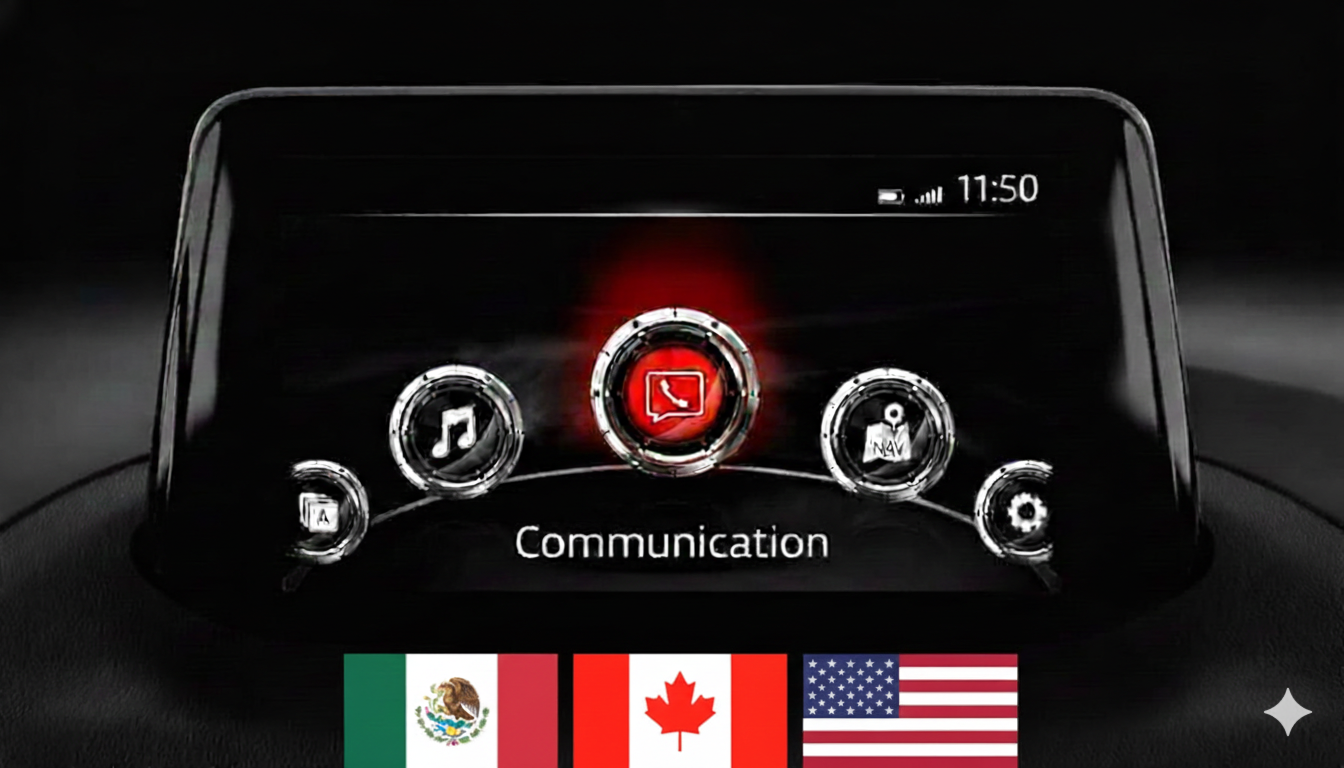
Important: This firmware is strictly for systems with the main menu layout shown in the photo (7-inch screen with icons in a semi-circle).
🌍 Regional Compatibility
Region Code: NA (North America) Supported countries include:
-
United States (USA)
-
Canada
-
Mexico
-
Puerto Rico
🚗 Applicable Models
-
Mazda 3: 2014–2018
-
Mazda 2: 2014–2021*
-
Mazda 6: 2015–2021
-
Mazda MX-5 Miata: 2014–2024*
-
CX-3: 2014–2021
-
CX-5: 2015–2021*
-
CX-9: 2015–2021*
Note: Not compatible with Mazda Connect System 2 (10.25″ / 26cm displays). Only for 1st Gen systems.
✅ Upgrade Path & Compatibility
If your current firmware is v70.00.021A or ABOVE (e.g., 70.00.100, 70.00.150, 70.00.335), you can update directly to v70.00.367A using this single file.
🛠️ Bug Fixes & Key Improvements
Version 70.00.367 includes a massive list of improvements:
-
System Reliability: Fixes random reboots while driving or playing CD/DVD. Resolves “black screen” issues on Mazda 6 and 360° view delays.
-
Connectivity: Improves compatibility with Android smartphones (HUAWEI P20/P30/Mate 20) and SONY USB audio devices. Fixes Bluetooth echo on MX-5 RF.
-
CarPlay™ & Android Auto: Updates CarPlay brand icons, fixes sound issues (driver-side speaker), and resolves GPS location errors in southern/western latitudes.
-
Navigation: Corrects freezing at the loading screen, speed limit display errors (TSR), and inaccurate map movements after parking.
-
User Interface: Improved fonts for i-stop/i-ELOOP, status bar visual fixes, and corrected translations (including Rear Camera messages and Cyrillic characters).
-
Media & Audio: Faster USB loading times, fixes for OGG/MP3 playback, and preservation of sound settings (Bass/Treble) after sleep mode.
-
Gracenote: Latest music metadata database is included.
📥 Installation Requirements
-
USB Drive: 4GB to 16GB (Strictly FAT32 formatted).
-
Time: Approximately 15–30 minutes.
-
Power: Ensure a healthy battery or keep the engine running.
🛠️ Installation Instructions
Step 1: Preparation
-
Format your USB stick to FAT32.
-
Copy the file
cmu150_NA_70.00.367A_update.updirectly to the root directory. -
Crucial: Disconnect all USB devices and remove the Navigation SD card before starting.
Step 2: Enter Diagnostic Mode
-
Turn vehicle to ACC or ON mode.
-
Press and hold: Music Note + Favorites + Mute (Volume) for about 5 seconds.
-
Navigate to: System Update > Search for Update.
Step 3: Update Process
-
The system will detect the single update file. Confirm to start.
-
Warning: Do not power off the car or remove the USB until the “Update Successful” message appears. The system will reboot automatically.
📦 What’s Included
-
Firmware File:
cmu150_NA_70.00.367A_update.up. -
Step-by-Step PDF Guide: A comprehensive manual is included for download and attached to the file.
Disclaimer: This update covers original Mazda systems only. We are not liable for malfunctions in aftermarket accessories or non-genuine components.
Reviews
There are no reviews yet.